*Plus & Pro Plans Only
Expensing materials is needed when purchase information has be added to the materials used; before the cost can be included in reports. These materials are ready to be expensed once the timecards they belong to have been approved. If the purchase information is always the same for certain materials, it is recommended you setup auto-expense for these ones.
To expense materials:
- Go to Employees > Expense Materials
- In the far left column check off all the materials you want to expense. You can select all by clicking on the check-box in the top header row.
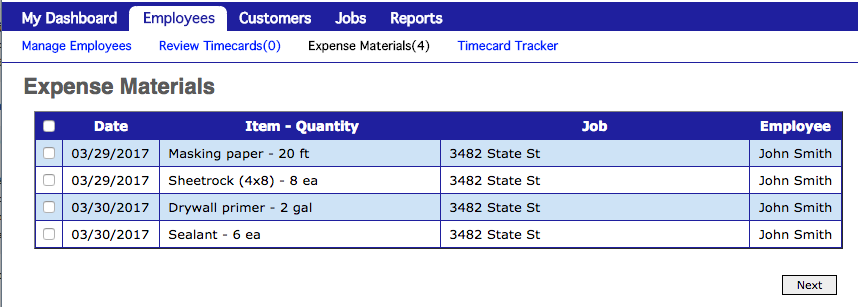
- Click Next
- Fill-in the information in the Purchase Information section. The Material Details are pre-filled from what was entered with the timecard, which you can modify as needed.
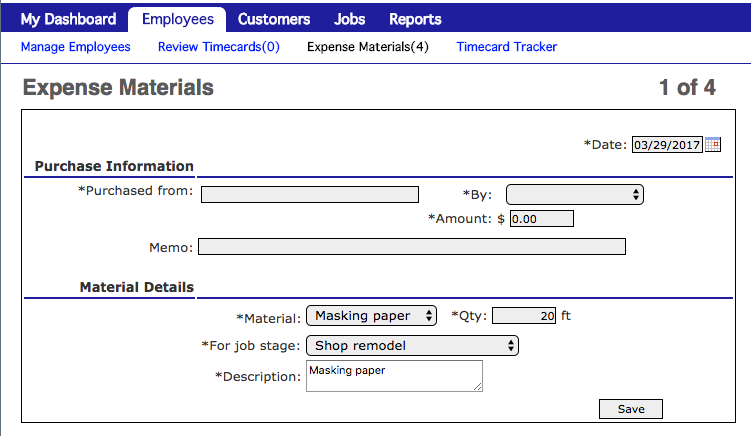
- Click Save
- The next material to be expensed will be shown. Repeat steps 4 & 5.