Overview
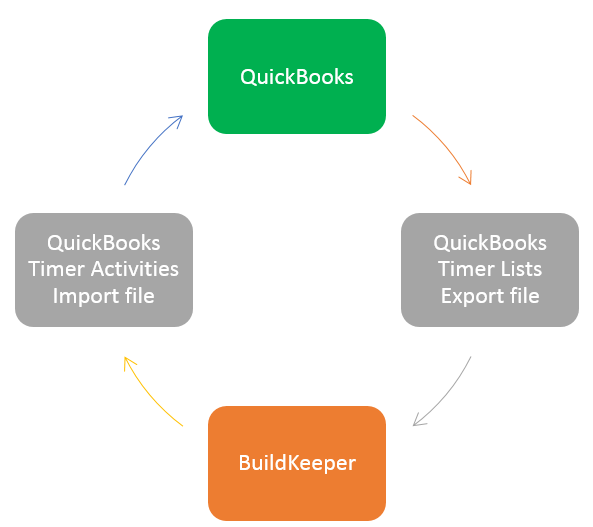
If your company uses QuickBooks to manage its finances, you can easily export your Employees, Customers, Jobs, and Items lists from QuickBooks into BuildKeeper. Additionally, once time has been recorded using BuildKeeper this time can be imported back into QuickBooks. Contact us if you would like to start using this feature.
Loading QuickBooks data into BuildKeeper
- In QuickBooks go to File > Utilities > Export > Timer Lists
- Save the file to your computer.
- In BuildKeeper go to Jobs > QuickBooks Import
- Click the Choose File button and select the file you use saved in step #2
- Click the Import button.
The import process will begin immediately. Depending on the size of your file it might take a few minutes for process to complete. You should load your QuickBooks data anytime new Employees or Jobs have been added.
Loading BuildKeeper time data into QuickBooks
- In BuildKeeper go to Reports > Time by Pay Period
- Select the time period for which you to import into QuickBooks.
- Click the
 button located at the top of the table.
 - Download and save the file to your computer.
- In QuickBooks go to File > Utilities > Import > Timer Activities
- Locate the file you saved in step #4 and click Open
After QuickBooks has finished bringing in the data, a summary report will be generated. You can also review the time in QuickBooks by going to Employees > Enter Time > Use Weekly Timesheet